The Thailand e-Visa is the online system Thai embassies use to issue visas. It has been available at all 94 Thai embassies and consulates since 1 January 2025, and some, such as Vientiane, accept nothing else. It has one official address, thaievisa.go.th, run by the Ministry of Foreign Affairs. You apply from home, upload your documents, pay online and receive the visa by email, with no passport to post. Most holidaymakers do not need it at all.
Do you need an e-Visa for Thailand?
| Your trip | e-Visa needed |
|---|---|
| Holiday of up to 30 days with a US, UK, Australian, Canadian or EU passport | No, you enter visa-free |
| Holiday of 31 to 60 days | Yes, tourist visa |
| Business meetings or a conference, even for a few days | Yes, since 15 September 2026 |
| Remote work for several months | Yes, DTV visa |
| Retirement, study, work in Thailand, joining a Thai spouse | Yes, Non-Immigrant visa |
| Passport from a country outside the exemption list | Yes, for any stay |
The visa-free stay dropped from 60 to 30 days on 15 September 2026 and now covers tourism only. Whatever you enter on, everyone fills in the free Thailand Digital Arrival Card before the flight.
Thailand e-Visa official website: thaievisa.go.th
The portal opened to the whole world on 1 January 2025, through 94 Thai embassies and consulates. Thai government websites end in .go.th. Any other address offering a "Thailand e-Visa" is a private agency that fills in the same form for you and adds its own fee. One agency puts that margin at 50 US dollars or more on top of the visa price.
How to apply for a Thailand e-Visa step by step
- Create an account on thaievisa.go.th with an email address you check often, then activate it from the email you receive.
- Fill in your profile in English and add a passport photo.
- Start an application and answer the eligibility questions: passport country, country of residence, then the embassy or consulate that covers where you live.
- Choose the purpose of the visit and the number of entries.
- Enter your personal and travel details. You can apply for someone else, such as a child, from your account.
- Upload the supporting documents listed for your visa.
- Pay the fee online.
- Wait for the email with the visa as a PDF, print it and keep it with your passport.
Some embassies add a step: a declaration to print, sign and scan, or an appointment. Follow the sequence shown for the embassy you selected.
In the United States the consulate depends on your state. Chicago covers 14 states and New York ten, among them New York, New Jersey, Pennsylvania, Massachusetts and Ohio. Check the list of states on your consulate's page before you start, because the fee is lost if the file goes to the wrong one.
For the DTV, embassies have asked since 31 August 2026 for proof that you are a citizen or permanent resident of the country where you apply, plus a police certificate. Applications filed and paid before that date keep the old list.
Thailand e-Visa documents and file formats
The base file is the same for most visas. The Chicago consulate asks for:
- a passport valid for six months with at least one blank page
- a recent passport photo, 2 x 2 inches
- a flight itinerary
- a recent bank statement
- the documents specific to your visa, such as an employment letter or an acceptance letter
Files are uploaded one by one. The embassy in Doha specifies JPG or JPEG, 3 MB at most per file, and a photo of at least 300 PPI on a white background, taken in the last six months. Formats can differ from one embassy to another. The upload screen shows what yours accepts, and older guides that mention a 200 KB limit are out of date.
Scan documents flat and in full. A cropped passport page, a phone photo taken at an angle or a name spelt differently from the passport leads to a request for new files, and each request adds days.
Thailand e-Visa cost and processing time by embassy
| Embassy or consulate | Tourist visa fee | Processing time |
|---|---|---|
| Chicago | 40 USD | Up to 15 working days, no express service |
| Washington | 40 USD | Apply at least 30 days ahead |
| London | 30 GBP, on a fee page dated 2022 | About 15 working days |
| Sydney | See the embassy page | About 10 working days |
| Vientiane | See the embassy page | 5 to 10 working days |
Embassy pages read on 14 November 2026. The single-entry tourist visa is priced at 1,000 THB and converted into local currency, and the multiple-entry version at 5,000 THB. Other Thai visas cost more: 10,000 THB for the DTV. Fees are never refunded.
When to apply
New York accepts applications between 90 and 30 days before travel. For a flight on 1 March, that means applying between 1 December and 30 January. Sydney cancels a file that is still incomplete after 45 days, without refund, takes Visa and Mastercard but not American Express, and issues a visa valid for three months. Some applications need approval from Bangkok, which can add four to six weeks.
Checking your e-Visa status, refusals and common mistakes
Log in to your account to follow the file. The portal's user guide describes a status menu for this. The embassy writes to the email address of the account when it needs another document, so check the spam folder during the weeks that follow.
Embassies do not publish a list of reasons for refusal, and New York states that it can reject an application without giving one. The mistakes agencies see most often are simple ones:
- wrong embassy for your place of residence
- unreadable scans or missing pages
- names or passport numbers that do not match the passport
- a bank balance below what the embassy asks for
- the wrong visa type for the purpose of the trip
A mistake in personal details can lead to cancellation, and a cancelled application means paying again. Read the preview screen line by line before you pay.
Thailand e-Visa, TDAC and ETA: which is which
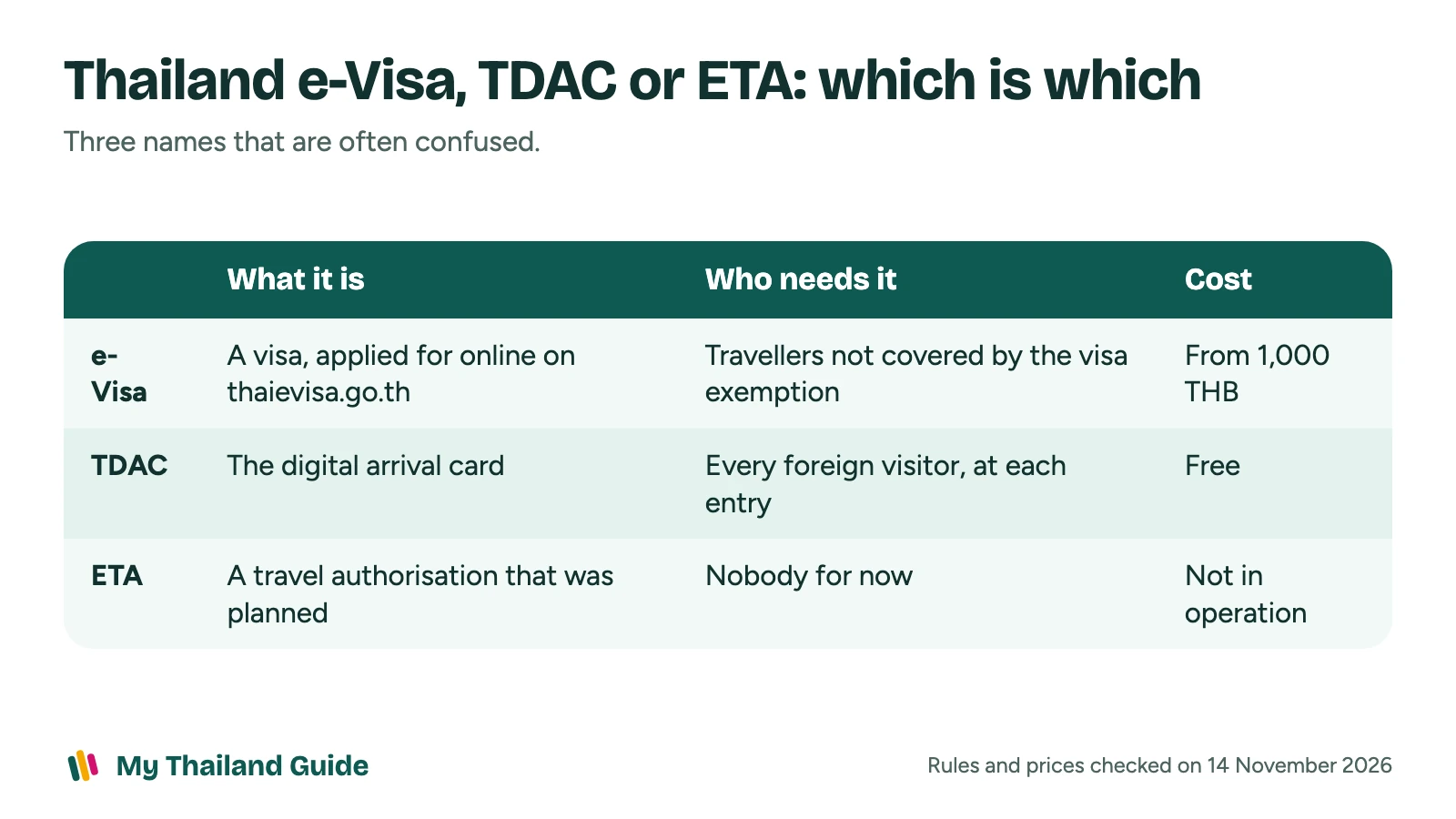
| What it is | Who needs it | Cost | |
|---|---|---|---|
| e-Visa | A visa, applied for online | Travellers not covered by the exemption | From 1,000 THB |
| TDAC | The digital arrival card | Every foreign visitor, at each entry | Free |
| ETA | A travel authorisation that was planned | Nobody for now | Not in operation |
Thailand announced an Electronic Travel Authorisation for visa-exempt travellers, with pilots planned for December 2024 and then June 2025. Neither took place. The government chose the arrival card instead, and on 14 November 2026 no ETA was in operation and no start date had been published. A website that sells a "Thailand ETA" today is selling something that is not required.